
Using Thunderbird (IMAP) with Microsoft Office 365
Thunderbird with Microsoft 365
https://helpdesk.eng.uci.edu/content/using-thunderbird-imap-microsoft-office-365
Using Thunderbird (IMAP) with Microsoft Office 365
You can configure your IMAP mail client such as Thunderbird to access your email on Microsoft Office 365.
Step-by-step Instructions
How to: Setup Microsoft 365 with Thunderbird
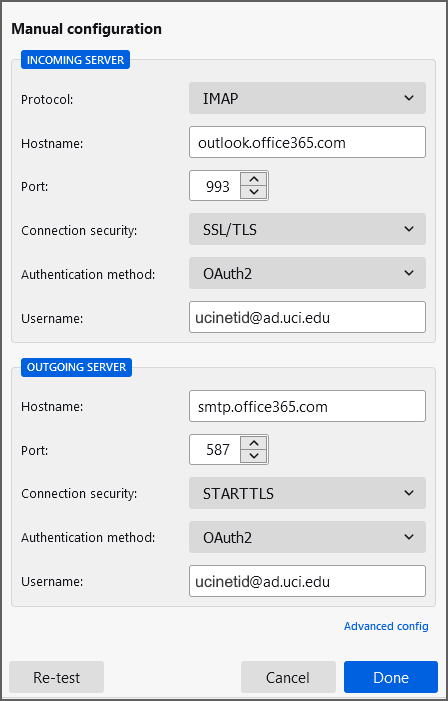
Settings
Server Type: IMAP
- Server name: outlook.office365.com
- Port: 993
- Connection security: SSL/TLS
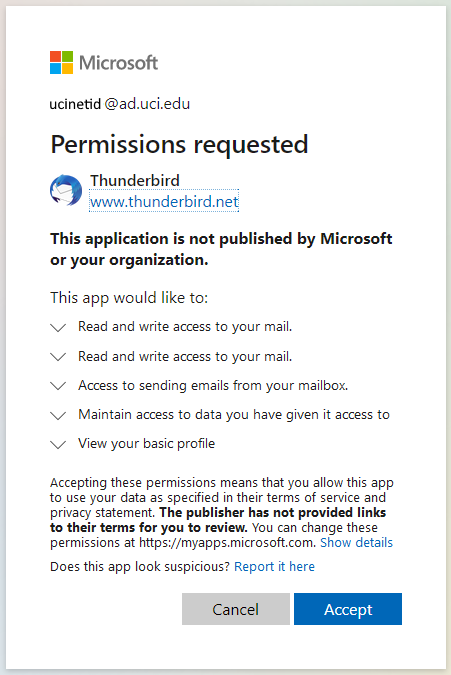
- Authentication method: OAuth2
- User name: ucinetid@ad.uci.edu
Server Type: SMTP
- Server name: smtp.office365.com
- Port: 587
- Connection security: STARTTLS
- Authentication method: OAuth2
- User name: ucinetid@ad.uci.edu
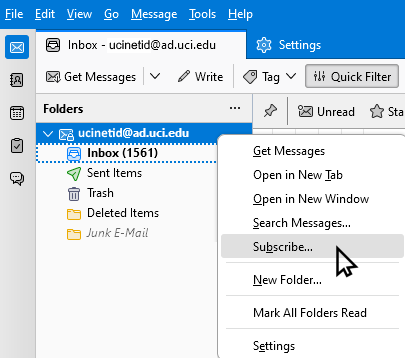
In the Thunderbird folder list, right click and select "Subscribe" to choose which IMAP folders are shown.
Quelle: Obsidian Knowledge Base/Thunderbird/Thunderbird with Microsoft 365.md · Stand: 2026-04-10 · Automatisiert publiziert durch Hermes.
No comments to display
No comments to display